Log on to rate and give feedback
1
2
3
4
5
Log on to rate
0

User Interface
Products:
AS-B, Edge Server, Device Administrator, AS-P
Functionalities:
Engineering, License Management
Product version:
2024, 7.0
3/11/2025
Entitlements View
Use the Entitlements view to view entitlements.
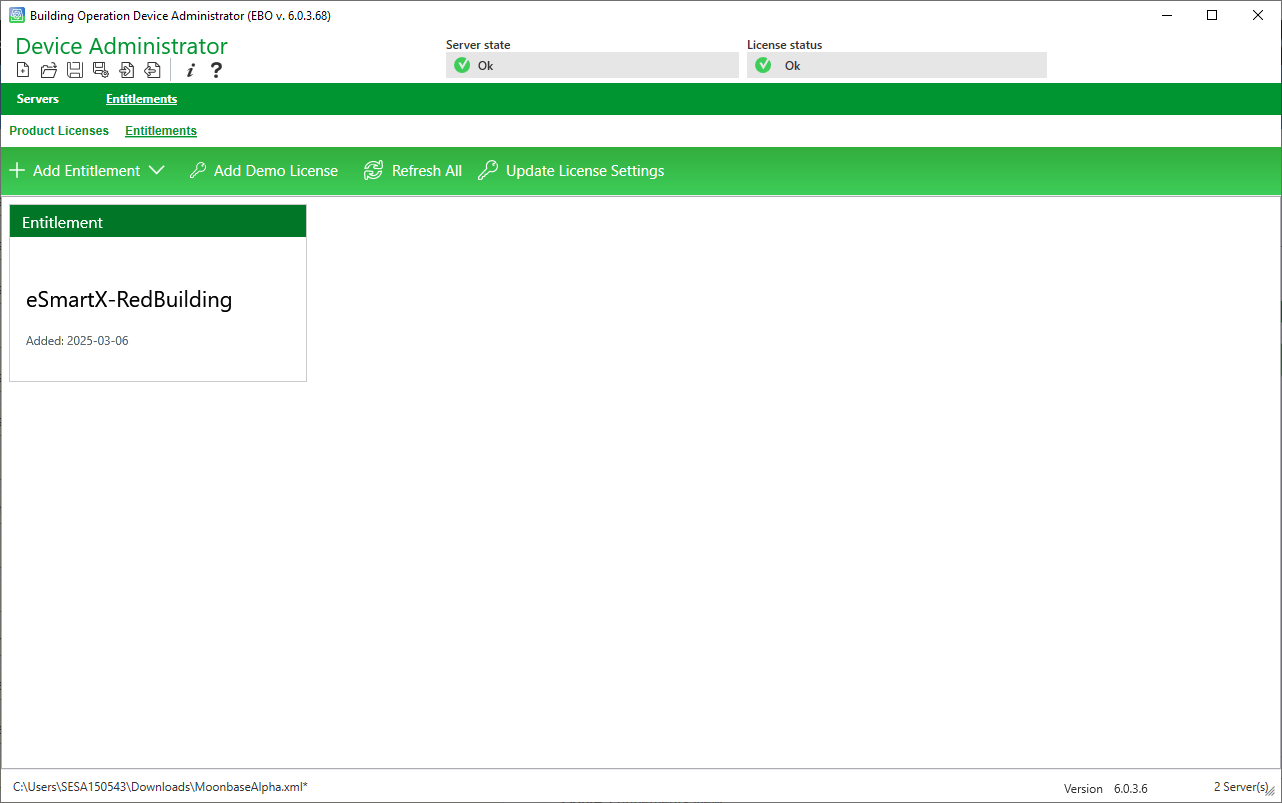
Figure:
Entitlements view
|
Component |
Description |
|
Add Entitlement |
Click to add an Entitlement. For more information, see Centralized Licensing Overview . |
|
Add demo license |
Click to add a demo license. |
|
Refresh all |
Click to refresh the list of Entitlements. |
|
Update License Setting |
Click to open the License Settings dialog box to change license server address, user name and password. For more information, see License Settings Dialog Box . |
|
Entitlement |
Click on the Entitlement to see the content of the Entitlement in the Entitlement Content view. For more information, see Entitlements Contents View . |
Entitlements Contents View
License Settings Dialog Box