
User Interface
Xenta Schedule Editor
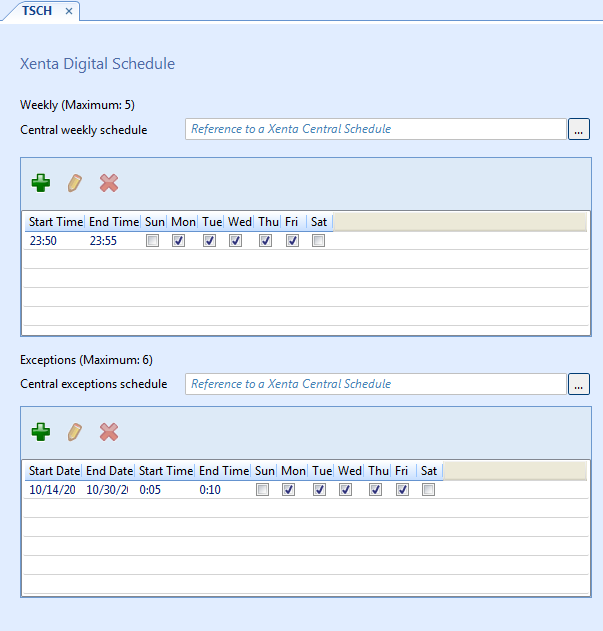
Use the Xenta Schedule Editor to view and configure weekly events and exception events for a Xenta schedule.
|
Number |
Description |
|
Weekly (Maximum) |
Displays the maximum number of weekly events the schedule can have. For more information, see Number of Scheduled Events for Xenta LonWorks Devices . |
|
Central weekly schedule/Central exceptions schedule/Lead central schedule |
Enter a central weekly or exception schedule reference, or enter a lead Xenta Central Schedule reference in a Xenta Central schedule. |
|
Lead central schedule |
Enter a lead Xenta Central Schedule reference. |
|

|
New Click to open the Xenta Schedule dialog box, where you can add an event. For more information, see Xenta Schedule Dialog Box .
|
|

|
Edit Click to open the Xenta Schedule dialog box, where you can edit an event . For more information, see Xenta Schedule Dialog Box .
|
|

|
Delete Click to delete a selected event. |
|
Weekly event table |
Displays the weekly events for the Xenta schedule or Xenta Central schedule. |
|
Exceptions (Maximum) |
Displays the maximum number of exceptions events the schedule can have. For more information, see Number of Scheduled Events for Xenta LonWorks Devices . |
|
|
New Click to open the Xenta Schedule dialog box, where you can add an event. For more information, see Xenta Schedule Dialog Box .
|
|
|
Edit Click to open the Xenta Schedule dialog box, where you can edit an event . For more information, see Xenta Schedule Dialog Box .
|
|
|
Delete Click to delete a selected event. |
|
Exceptions event table |
Displays the exception events for the Xenta schedule. |
 Schedules for Xenta LonWorks Devices
Xenta Central Schedules
Number of Scheduled Events for Xenta LonWorks Devices
Xenta Schedule Dialog Box
Schedules for Xenta LonWorks Devices
Xenta Central Schedules
Number of Scheduled Events for Xenta LonWorks Devices
Xenta Schedule Dialog Box