
User Interface
Software Administrator – Enterprise Central View
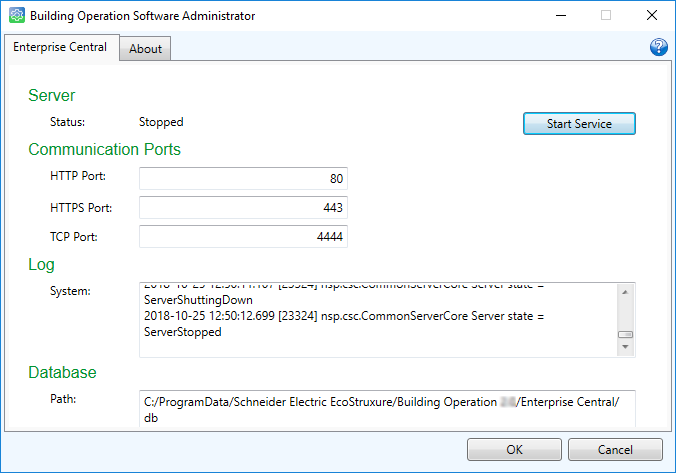
Use the Enterprise Central view to start and stop the Enterprise Central service and configure the ports of Enterprise Central.
|
Component |
Description |
|
Status |
Displays the current status of the Enterprise Central Windows service. |
|
Start Service |
Click to start Enterprise Central. |
|
Stop Service |
Click to stop Enterprise Central. |
|
HTTP Port |
Type the port number that Enterprise Central listens to when communicating through the Hypertext Transfer Protocol. |
|
HTTPS Port |
Type the port number that Enterprise Central listens to when communicating through the Hypertext Transfer Protocol Secure. |
|
TCP Port |
Type the port number that Enterprise Central listens to when communicating through the Transmitting Control Protocol. |
|
System |
Displays the system log. |
|
Path |
Displays the path to the folder where the Enterprise Central database and other objects created by Enterprise Central or users are stored. |

|
A warning indicates that you entered a conflicting port number or that the service is stopping. |
 Starting the Enterprise Central Windows Service
Stopping the Enterprise Server Windows Service
Restarting the Enterprise Server Windows Service
Starting the Enterprise Central Windows Service
Stopping the Enterprise Server Windows Service
Restarting the Enterprise Server Windows Service
 Software Administrator
Configuring Server Port Settings
Software Administrator
Configuring Server Port Settings