Log on to rate and give feedback
1
2
3
4
5
Log on to rate
5

User Interface
Products:
WebStation
Functionalities:
Basic Functionality
Product version:
1.8, 1.9
12/10/2024
Building Operation WebStation Window
Use the Building Operation WebStation window to log on to WebStation.
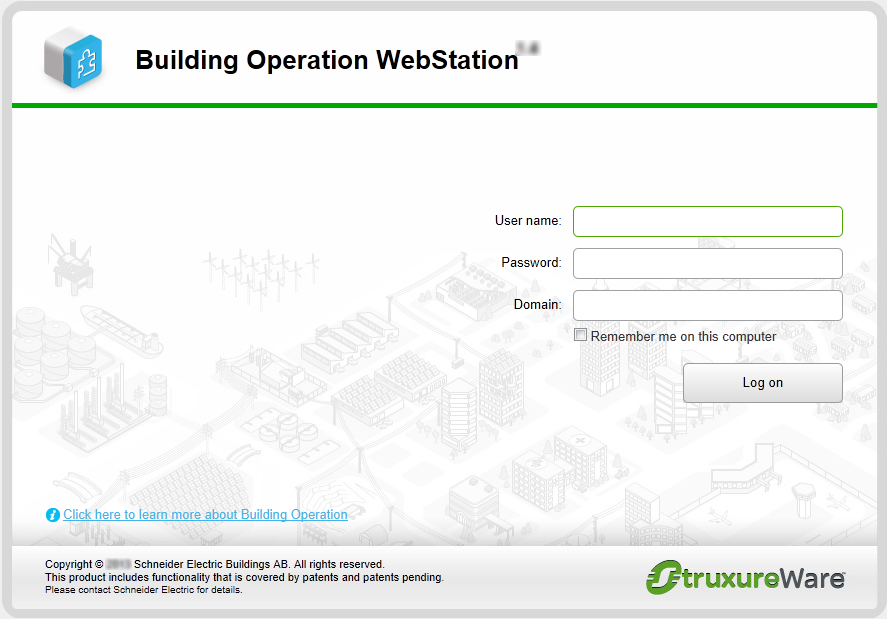
Figure:
Building Operation WebStation Window
|
Component |
Description |
|
User name |
Type the user name. |
|
Password |
Type the password. |
|
Domain |
Type the name of the domain you want to log on to. If you do not enter a domain, you log on to the server local domain. For more information, see Domains . |
|
Remember me on this computer |
Select to save the entered information. The information is automatically filled in the next time you log on. |
|
Log on |
Click to log on to WebStation. |
|
Click here to learn more about Building Operation WebStation |
Click to open the WebHelp home page. For more information, see WebHelp Overview . |
 Log on to WorkStation or WebStation