
User Interface
Create Alarm Wizard – Presentation Page
Use the Presentation page to configure the presentation settings of the alarm.
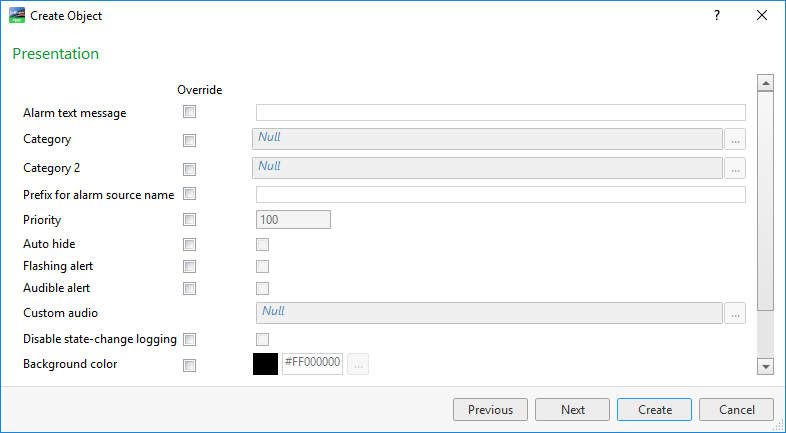
Component | Description |
Above upper limit message | Type the message to display when the variable exceeds the upper limit of the alarm. |
Below lower limit message | Type the message to display when the variable falls below the lower limit. |
Alarm message | Type the message to display when the alarm is in Alarm state. For more information, see Alarm Messages . |
Reset message | Type the message to display when the alarm is reset. For more information, see Alarm Messages . |
Category | Enter the category the alarm belongs to. For more information, see Categories . |
Category 2 | Enter the second category the alarm belongs to. For more information, see Categories . |
Prefix for alarm source name | Add a substitution code or type a prefix that is added to the beginning of the source name property of an alarm record. For more information, see Substitution Codes for Notifications . |
Above upper limit priority | Enter the priority level of the alarm when the variable exceeds the upper limit. For more information, see Priority . |
Below lower limit priority | Enter the priority level of the alarm when the variable falls below the lower limit. For more information, see Priority . |
Alarm priority | Enter the priority level of the alarm. For more information, see Priority . |
Reset priority | Enter the priority level of the alarm when it is reset. For more information, see Priority . |
Same priority | Select to set all priorities to the same value. For more information, see Priority . |
Auto hide | Select to automatically hide the alarm in the Alarms pane or Alarm View. For more information, see Alarm Decoration . |
Flashing alert | Select to make the alarm row flash in the Alarms pane and Alarm Views when the alarm is triggered. For more information, see Alarm Decoration . |
Audible alert | Select to make the alert audible when the alarm is triggered. For more information, see Alarm Decoration . |
Custom audio | Enter the path to the custom audio file you to play when the alarm is triggered. For more information, see Custom Audible Alarm Alerts. |
Disable state-change logging | Select to prevent an alarm state change from creating an event. For more information, see Alarm State-change Logging . |
 Alarm Functions
 Create Alarm Wizard – User Action Page
Create Alarm Wizard – Attachment Page
Create Object Wizard – Naming the Object Page
Substitution Codes for Notifications
Alarm Messages
Categories
Priority
Alarm Decoration
Custom Audible Alarm Alerts
Alarm State-change Logging