
User Interface
SSL Root Certificate Dialog Box
Use the SSL Root Certificate dialog box to manage a root certificate.
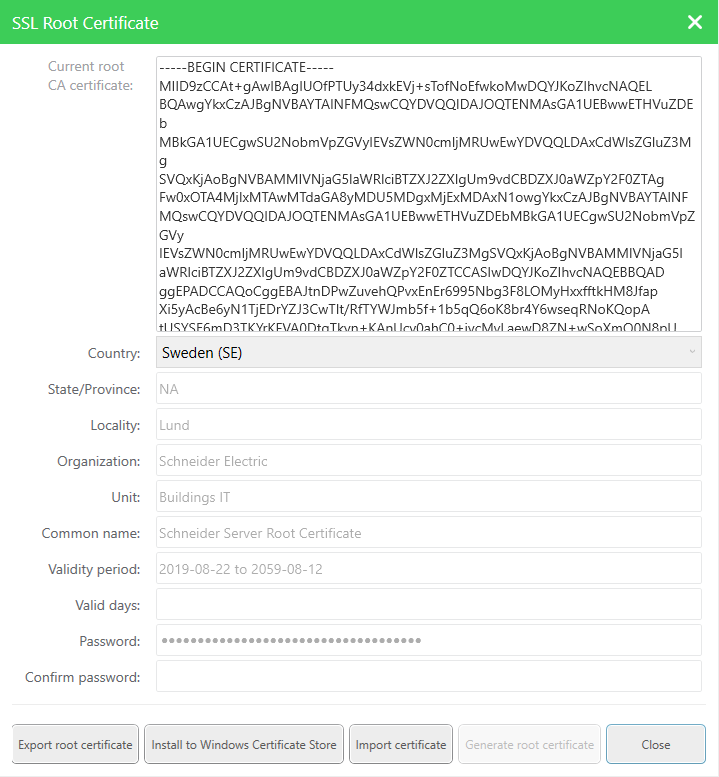
Component | Description |
Current root CA certificate | Displays the current root certificate. |
Country | Type the country. |
State/Province | Type the state/province. |
Locality | Type the locality. |
Organization | Type the organization. |
Unit | Type the unit. |
Common name | Type the common name. |
Validity period | Enter the calendar end date for the certificate. |
Valid days | Type the number of days the certificate is to be valid. The first day is the day when the certificate is generated. |
Password | Type a password. |
Confirm password | Type the password again. |
Export root certificate | Click to export the root certificate. |
Install to Windows Certificate Store | Click to install Windows trusted root certificate. |
Import certificate | Click to import a self-signed certificate. |
Generate root certificate | Click to generate a self-signed certificate. |
 Certificates in Device Administrator