earth_america
user_standard Log on
earth_america
Log on to rate and give feedback 1 2 3 4 5 Log on to rate
0
How to

How to


Products: Enterprise Central, Enterprise Server, FDP Server, WorkStation
Functionalities: Basic Functionality
10/30/2025

Configuring the Retain Level

Configure the retain level to control what happen to values when different system events occurs.

Show More
action_close

Retain level is a property of a variable that determines the variables persistence during restarts. This is important for saving user-configured values or specific application data that should survive a reboot.

Variable Values Storage

Variable values are stored in the following way:

  • Flash memory is used to store most variable values, so they survive power failures and server shutdowns.

  • SDRAM, that is a temporary memory, is used for frequently collected values to avoid wearing out the flash memory.

User Configured Retain Levels

All variable has a retain level that can be configured by the user. The retain level controls if the value of the variable is retained after a restart. The retain levels affect:

  • Whether the value is kept after a cold start or warm start

  • Whether the value is saved in the configuration database

The default setting for retain level in the variable is Warm start.

Table: User Configured Retain Levels and Restart Mode

Restart mode

Retain level configured by user:

No

Retain level configured by user:

Warm start

Retain level configured by user:

Cold start

Warm start


Values configured by a user or application are lost.

Variable retains last value configured by a user.

Values configured by an application are retained. 

Variable retains last value configured by a user.

Values configured by an application are retained. 

Cold start

Values configured by a user or application are lost.

Variable loses last value configured by a user.

Values configured by an application are lost.

Variable retains last value configured by a user.

Values configured by an application are retained. 

Retain Levels for Events and Activities

A restart can be initiated in a number of ways.

Table: Retain Levels for Certain Events and Activities

System Events and Activities

Initiated from

System response

Variable retain level

Warm start command

WorkStation

Application restarts

Warm start

Cold start command

WorkStation

Application restarts

Cold start

Restart command

Device Administrator

Full device restart

Warm start

Power fail

X

Full device restart

Warm start

Restore (from a backup)

WorkStation

Application restarts

Warm start

Upgrade

WorkStation

Full device restart

Warm start

Exporting & Importing

WorkStation

Application restarts

Warm start

Reset button

One short push on Reset button on field server.

Full device restart

Warm start

Function Block

Function block objects have their own backup function. The backup function in Function Block overrides the retain level in EcoStruxure BMS for a warm start. For more information, see Function Block Program - Retain Versus Backup .

To configure the retain level
  1. In WorkStation, in the System Tree pane, click the value.

  2. Click the Configure button

     
    action_zoom_plus_stroke
    .

  3. Select Retain level .

     
    action_zoom_plus_stroke
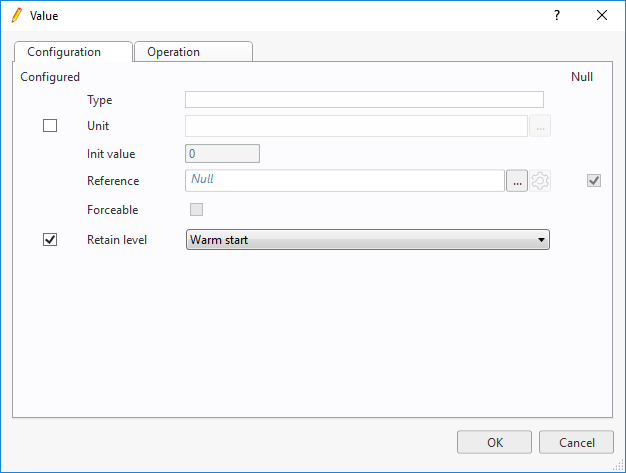
  4. In the Retain level box, select the retain level.

  • Retain Level
  • Configure Dialog Box – Configuration Tab
  • Configure Dialog Box – Operation Tab
  • Mass Editing the Retain Level of Properties