Log on to rate and give feedback
1
2
3
4
5
Log on to rate
0

User Interface
Products:
WebStation
Functionalities:
Basic Functionality
10/30/2025
Settings – Default Regional Settings Dialog Box
Use the Default Regional Settings dialog box to adapt WebStation to your region.
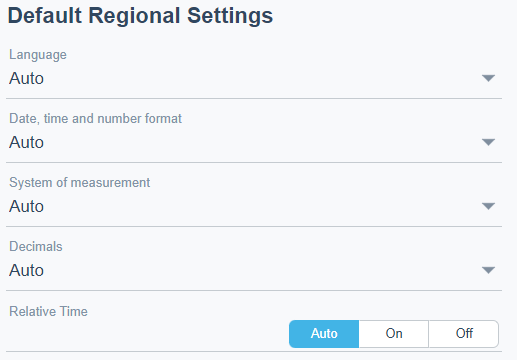
Figure:
Regional settings dialog box
|
Component |
Description |
|
Language |
Select the language you want to use. For more information, see Regional Settings . |
|
Date, time and number format |
Select the date, time, and number format you want to use. For more information, see Regional Settings . |
|
System of Measurement |
Select the measurement system you want to use. For more information, see Regional Settings . |
|
Decimals |
Select the number of decimals. For more information, see Regional Settings . |
|
Relative time |
Select if you want to use relative time . For more information, see Regional Settings . |
 Regional Settings
 and Theme Settings
User Settings – Regional Settings Dialog Box
User Settings – Theme Settings Tab
Default System Settings – Theme Settings Tab
Lead and Shadow Relationship
Language Packages
Regional Settings
Regional Settings and Theme Settings
User Settings – Regional Settings Dialog Box
User Settings – Theme Settings Tab
Default System Settings – Theme Settings Tab
Lead and Shadow Relationship
Language Packages