Log on to rate and give feedback
1
2
3
4
5
Log on to rate
0

User Interface
Products:
Enterprise Central, Enterprise Server, FDP Server
Functionalities:
Schedules
10/30/2025
Edit Time Value Period Dialog Box
Use the Edit Time Value Period dialog box to modify weekly or exception events in the Advanced Schedule Editor.
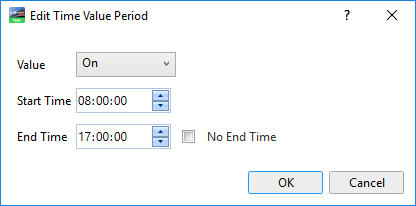
Figure:
Edit Time Value Period dialog box
|
Component |
Description |
|
Value |
Enter the value associated with the event. |
|
Start Time |
Click the up or down arrows to select the hours, minutes, and seconds for the start time. You can also type the time if you want. |
|
End Time |
Click the up or down arrows to select the hours, minutes, and seconds for the end time. You can also type the time if you want. |
|
No End Time |
Click the checkbox to have the event last all day. |
Advanced Schedule Editor – Graphic View