
User Interface
Trend Log List Properties
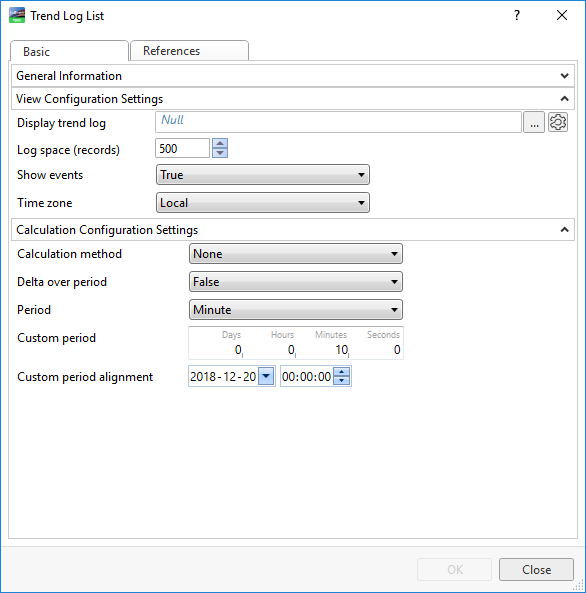
Use the Trend Log List properties to configure the trend log list.
|
Component |
Description |
|
Display trend log |
Enter the trend log to display in the trend log list. |
|
Log space (records) |
Select the maximum number of records to display in the trend log list.
|
|
Show events |
Select True to display events in the trend log list. This function does not hide events in the list that contain a value or comment. For example, when a record is added, edited, or commented. |
|
Time zone |
Select which time perspective to display in the trend log. For more information, see Time Zone Modes in a Trend Log List . |
|
Calculation method |
Select a calculation method. |
|
Delta over period |
Select True to apply a period to the delta calculation method. |
|
Period |
Select the time span for which the calculation method is to be executed. |
|
Custom period |
Enter a custom time span for which the calculation method is to be executed. |
|
Custom period alignment |
Enter the time when you want the custom period to start. |
 Trend Log Lists
Time Zone Modes in a Trend Log List
Trend Log List Context Menu
Trend Log List Toolbar
Trend Log List – Log Info View
General Information Properties – Basic Tab
References Tab
Trend Log Lists
Time Zone Modes in a Trend Log List
Trend Log List Context Menu
Trend Log List Toolbar
Trend Log List – Log Info View
General Information Properties – Basic Tab
References Tab