
User Interface
Variable Triggered Trend Log Properties – Basic Tab
Use the Basic tab to configure the Variable triggered trend log.
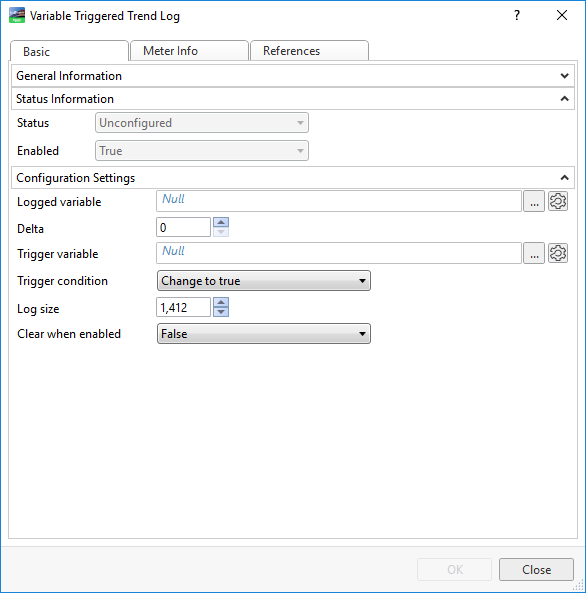
|
Component |
Description |
|
Status |
Displays the status of the trend log. |
|
Enabled |
Displays True if the trend log is enabled. |
|
Logged variable |
Enter the variable you want to log. |
|
Delta |
Select the minimum value change that triggers a new record. |
|
Trigger variable |
Enter the variable that triggers the trend log to start recording. |
|
Trigger condition |
Select when you want the variable recorded: when the trigger variable changes to True, changes to False, or at all changes. For more information, see Variable Triggered Trend Logs . |
|
Log size |
Select the number of records to store before old records are overwritten, including internal records generated by the trend log. For more information, see Log Record Storage . |
|
Clear when enabled |
Select True to clear the trend log when it is enabled. |
 Variable Triggered Trend Logs
Trend Log Types
Configure Dialog Box – Configuration Tab
Configure Dialog Box – Operation Tab
Variable Triggered Trend Logs
Log Record Storage
General Information Properties – Basic Tab
References Tab
Variable Triggered Trend Logs
Trend Log Types
Configure Dialog Box – Configuration Tab
Configure Dialog Box – Operation Tab
Variable Triggered Trend Logs
Log Record Storage
General Information Properties – Basic Tab
References Tab
 Missing Trend Log Records