Log on to rate and give feedback
1
2
3
4
5
Log on to rate
0

User Interface
Products:
WorkStation
Functionalities:
Basic Functionality
10/30/2025
Watch Pane and Watch View Toolbar
Use the Watch pane and Watch View toolbar to manage the objects in the list.
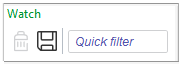
Figure:
Watch pane and Watch View toolbar
|
Component |
Description |
|

|
Remove from Watch Window
Click to remove a selected object from the Watch pane. |

|
Save current settings
Click to save the current list of objects. |
|
Quick filter |
Enter a word or a character to filter on. For more information, see Quick Filter . |
 Watch Pane and Watch View
Quick Filter
Pane Menu
Watch Pane and Watch View
Quick Filter
Pane Menu