
User Interface
User Account – Summary Tab
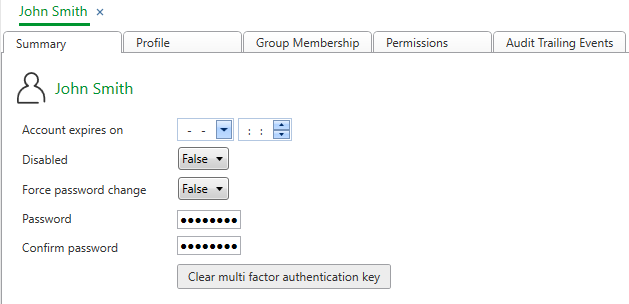
Use the Summary tab to edit the basic settings for a user account. For example, you can enable or disable the user account, or change the password for the account.
|
Component |
Description |
|
Expires on |
Enter an expiration date and time for the user account. By default, there is no expiration date for the account. |
|
Disabled |
Select True to disable the user account. |
|
Force password change |
Select True to force the user to change password after the initial logon. |
|
Password |
Type the password again. |
|
Confirm password |
Type the password again. |
|
Clear multi factor authentication key |
Click to clear the user's multi factor authentication key. If you click this button the user must re-pair the device that runs the authenticator app with the user account again. For more information, see Multi-factor Authentication . |
 User Accounts and User Account Groups
User Account Wizard – General Page
Password Policy
Multi-factor Authentication
User Accounts and User Account Groups
User Account Wizard – General Page
Password Policy
Multi-factor Authentication