
User Interface
Schedule Event Properties Dialog Box – Calculated Exception View
Use the Calculated Exception View in the Schedule Event Properties dialog box to schedule recurring exceptions.
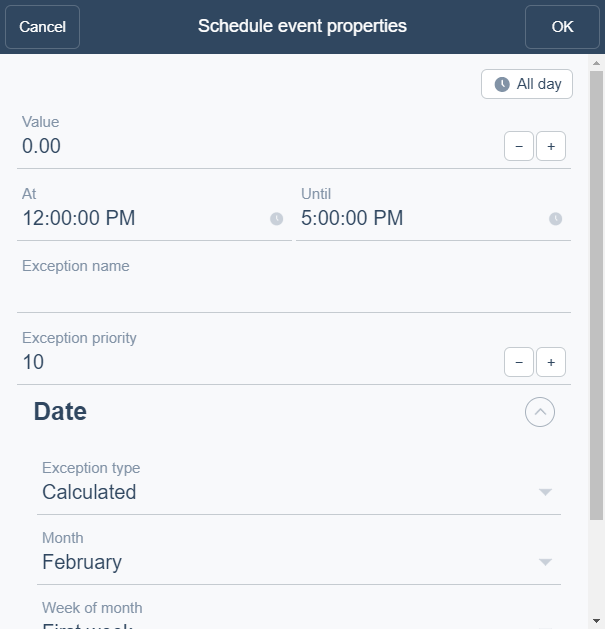
|
Component |
Description |
|
All Day |
Select to create an all day event. |
|
Value |
Enter a value for the exception event. |
|
At |
Enter the start time for the exception event. |
|
Until |
Enter the end time for the exception event. |
|
Exception name |
Type a name for the event. |
|
Exception priority |
Select a priority number between 1 (highest priority) and 16 (lowest priority). |
|
Event type |
Select Calculated . |
|
Month |
Enter the month when the calculated exception event occurs. |
|
Week of month |
Enter the day of month when the calculated exception event occurs. Select a week of the month for the exception event or First week , Second week , Third week , Fourth week , Last week , Any week .
|
|
Day of week |
Enter the day of week when the calculated exception event occurs. |
 Exception Events in WebStation
Schedule Event Properties Dialog Box – Weekly View
Schedule Event Properties Dialog Box – Single Date Exception View
Schedule Event Properties Dialog Box – Date Range Exception View
Schedule Event Properties Dialog Box – Calendar Reference View
Exception Events in WebStation
Schedule Event Properties Dialog Box – Weekly View
Schedule Event Properties Dialog Box – Single Date Exception View
Schedule Event Properties Dialog Box – Date Range Exception View
Schedule Event Properties Dialog Box – Calendar Reference View