Log on to rate and give feedback
1
2
3
4
5
Log on to rate
0

User Interface
Products:
Enterprise Server, FDP Server, WorkStation
Functionalities:
Basic Functionality, Trends
10/30/2025
Add/Remove Columns Dialog Box (Trends)
Use the Add/Remove Columns dialog box to add or remove columns from the trend log list.
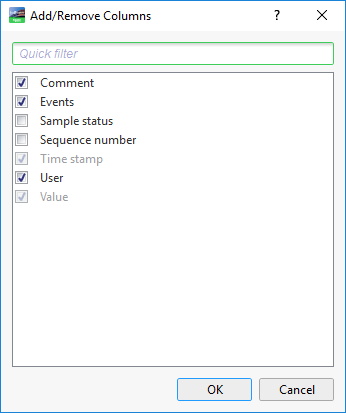
Figure:
Add/Remove Columns dialog box
|
Component |
Descriptin |
|
Comment |
Select to display the comment added by a user or system. For more information, see Comments . |
|
Events |
Select to display any events that occurred. |
|
Sample status |
Select to display the condition when the sample was recorded. |
|
Sequence number |
Select to display the event sequence number on the present EcoStruxure BMS server. |
|
Time stamp |
Select to display the time and date when the event was generated. |
|
User |
Select to display the user name that generated the event. |
|
Value |
Select to display the value. |
 Trend Log Lists
Add/Remove Columns Dialog Box
Quick Filter
Trend Log Lists
Add/Remove Columns Dialog Box
Quick Filter