
User Interface
Field Server – Date & Time View
Use the Date & Time view to configure the field server time and time zone.
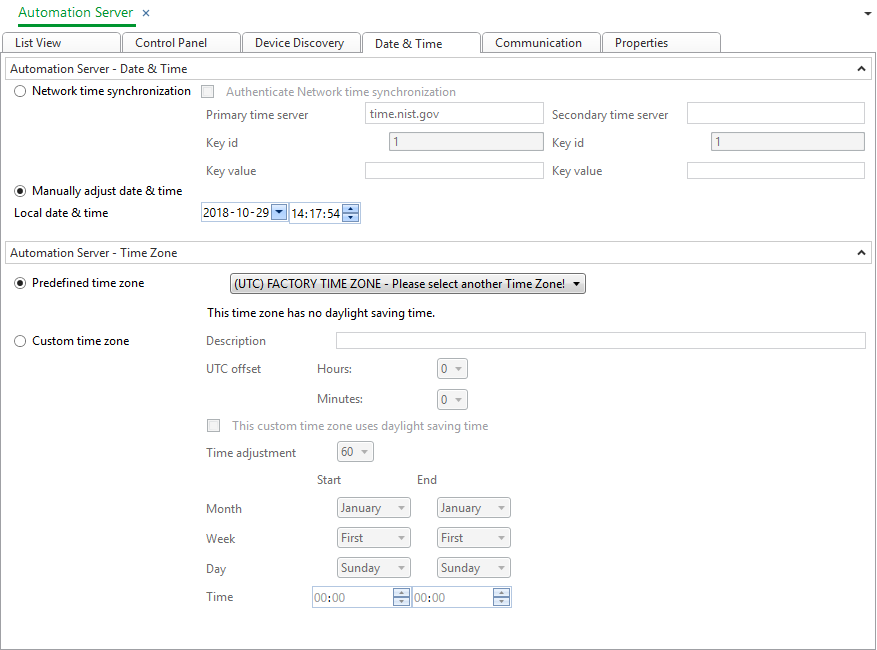
Component | Description |
Network time synchronization | Select to synchronize the automation server clock with a network time server. |
Authenticate Network time synchronization | Select if you want to use authenticated network time synchronizing. |
Primary time server | Type the address to the primary time server to which the shadow automation server date and time object synchronizes its clock. |
Secondary time server | Type the address to the secondary time server to which the shadow automation servers' date and time object synchronizes its clock. |
Key id | Type the ID of the authentication key for the primary time server. |
Key id | Type the ID of the authentication key for the secondary time server. |
Key value | Type the password for the primary time server. |
Key value | Type the password for the secondary time server. |
Manually adjust date & time | Select to manually set the automation server clock. |
Local date & time | Enter the date and time you want to set the automation server clock to. This time is displayed in automation server local time. |
Predefined time zone | Select the time zone the EcoStruxure BMS server belongs to. |
Custom time zone | Select to manually define the EcoStruxure BMS server time zone. |
Description | Type a description or name for the customized time zone DST settings. |
UTC offset | Select the time difference the time zone has from UTC in the hours and minutes boxes. |
This custom time zone uses daylight saving time | Select to enable the daylight saving time settings for the custom time zone. |
Time adjustment | Select the time adjustment, in minutes, for the daylight saving time. |
Month - Start | Select the month that daylight saving time starts. |
Week - Start | Select the week of the month that daylight saving time starts. |
Day - Start | Select the day of the week that daylight saving time starts. |
Time - Start | Select the time that daylight saving time starts. |
Month - End | Select the month that daylight saving time ends. |
Week - End | Select the week that daylight saving time ends. |
Day - End | Select the day of the week that daylight saving time ends. |
Time- End | Select the time that daylight saving time ends. |
 Time and Time Zone Configuration in Automation Server
Network Time
 List View Toolbar
Device Discovery View
Communication View