Log on to rate and give feedback
1
2
3
4
5
Log on to rate
0

User Interface
Products:
Enterprise Central, Enterprise Server, FDP Server
Functionalities:
Trends
10/30/2025
Multi Trend Log List Header Context Menu
Use the Multi Trend Log List header context menu to edit how trends are displayed in the multi trend log list.
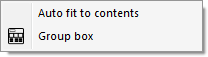
Figure:
Multi trend log list header context menu
|
Command |
Description |
|
Auto fit to contents |
Click to fit the column width to the content. |
|
Group box |
Click to open the Group box where you group objects to get a better overview of the objects in the multi trend log list. |
 Multi Trend Log Lists
Multi Trend Log List View
Multi Trend Log Lists
Multi Trend Log List View
 Fitting the Column Width to the Contents
Grouping Objects
Removing a Group
Fitting the Column Width to the Contents
Grouping Objects
Removing a Group