
User Interface
Settings Menu – Options Tab
Use the Settings menu to select workspace, change password, change regional settings, add or remove languages, or log off.
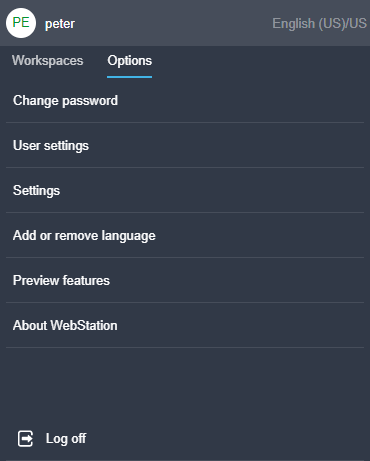
|
Command |
Description |
|
Change password |
Click to open the Change password dialog box where you change your password. For more information, see Change Password Dialog Box . |
|
User settings |
Click to open the user settings Regional Settings and Theme Settings menus. For more information, see User Settings – Regional Settings Dialog Box . For more information, see User Settings – Theme Settings Tab . |
|
Settings |
Click to open the default system Settings menu. |
|
Add or remove language |
Click to open the Add or remove language dialog box where you add or remove languages. For more information, see Add or Remove Languages Dialog Box . |
|
Preview features |
Click to open the Preview features menu. |
|
About WebStation |
Click to view the version of WebStation you are using. |
|
Log off |
Click to log off. |
 Workspaces
Change Password Dialog Box
User Settings – Regional Settings Dialog Box
User Settings – Theme Settings Tab
Settings – Default Regional Settings Dialog Box
Default System Settings – Theme Settings Tab
Language Packages
Regional Settings
Add or Remove Languages Dialog Box
Workspaces
Change Password Dialog Box
User Settings – Regional Settings Dialog Box
User Settings – Theme Settings Tab
Settings – Default Regional Settings Dialog Box
Default System Settings – Theme Settings Tab
Language Packages
Regional Settings
Add or Remove Languages Dialog Box