
User Interface
Semantic Engineering Context Menu
Use the Semantic engineering menu to edit the semantic model in the Semantic editing table .
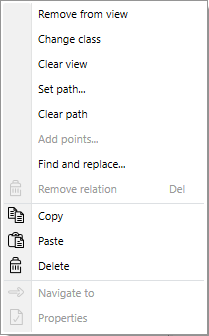
|
Command |
Description |
|
Remove from view |
Click to remove the selected semantic item from the table. The semantic item remains in the semantic model and keep all its relationship. |
|
Change class |
Click to change the class the selected sementic item belongs to. |
|
Clear view |
Click to clear the view in the Semeanti engineering table. All semantic items remanins in the semantic model and keep all their relationship. |
|
Set path |
Click to open the Select Object and Properties dialog box to create a relationship between the selected semantic object and an EBO object. |
|
Clear path |
Click to remove the relationship between the selected semantic item and the EBO object. |
|
Add points |
Click to add a semantic point. |
|
Find and replace |
Click to open the Find and Replace dialog box. |
|
Remove relation |
Click to remove the relationship between the selected semantic item and all other related semantic items. |
|
Copy |
Click to copy the semantic item. |
|
Paste |
Click to paste a semantic item. |
|
Delete |
Click to delete a semantic item. |
|
Navigate to |
Click to navigate to the EBO object related to the selected semantic item. |
|
Properties |
Click to open the properties for the selected semantic item. |
 Semantic Engineering Overview
Semantic Engineering View
Semantic Engineering Menu
Semantic Engineering Navigation Search Tab
Semantic Engineering Navigation Brick Tab
Semantic Editing Table
Semantic Engineering Context Menu
Semantic Engineering Overview
Semantic Engineering View
Semantic Engineering Menu
Semantic Engineering Navigation Search Tab
Semantic Engineering Navigation Brick Tab
Semantic Editing Table
Semantic Engineering Context Menu