
User Interface
Workspace Properties
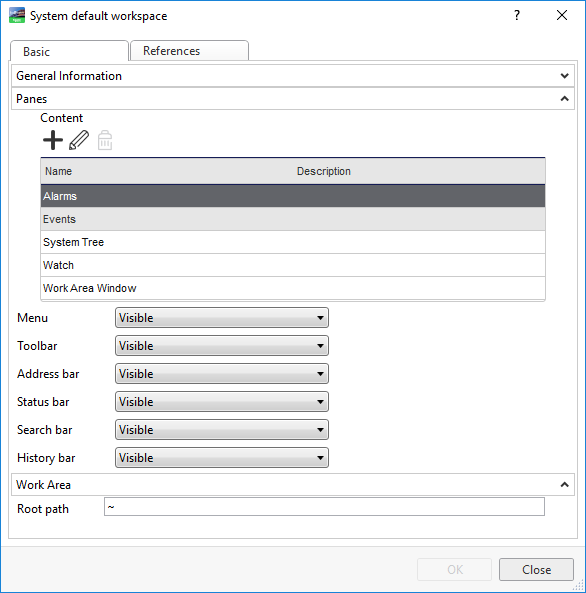
Use the Workspace properties to configure the properties of a workspace.
|
Component |
Description |
|

|
Add Click to add a pane to the workspace. For more information, see Create Object Dialog – Naming the Object Page . |
|

|
Edit Click to edit a workspace pane. For more information, see Pane Properties . |
|

|
Remove Click to remove a workspace pane. |
|
Menu |
Select Visible to show the menu in the workspace. |
|
Toolbar |
Select Visible to show the toolbar in the workspace. |
|
Address bar |
Select Visible to show the address bar in the workspace. |
|
Status bar |
Select Visible to show the status bar in the workspace. |
|
Search bar |
Select Visible to show the search bar in the workspace. |
|
History bar |
Select Visible to show the history bar in the workspace. |
|
Root path |
Enter the path for the workspace component. |
 Workspace Components and Customization
Pane Properties
Workspace Components and Customization
Pane Properties
 Workspace Layout Changes Have Disappeared
General Information Properties – Basic Tab
Pane Properties
Create Object Dialog – Naming the Object Page
Workspace Layout Changes Have Disappeared
General Information Properties – Basic Tab
Pane Properties
Create Object Dialog – Naming the Object Page