
User Interface
Context Configuration – Template Tab
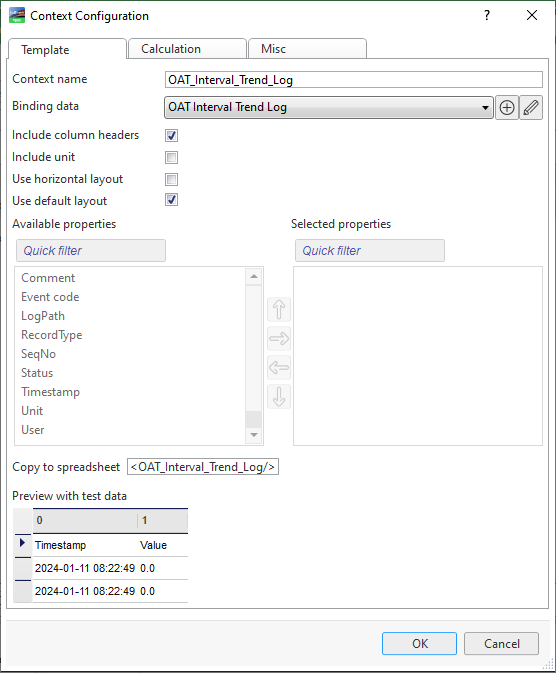
Use the Context Configuration – Template tab to configure the template.
|
Component |
Description |
|
Context name |
Type a name for the context. |
|
Binding data |
Select, edit, or create binding data. |
|
Include column header |
Select to include column headers in the report. |
|
Include unit |
Select to include the unit you want to include in the report. |
|
Use horizontal layout |
Select if you want a horizontal layout. |
|
Use default layout |
Clear Use default layout if you want to manually select available properties. |
|
Available properties |
Displays available properties that can be included in the report. |
|
Selected properties |
Select available properties to be included in the report. Use default layout must be cleared for the properties to be selected. |
|
Copy to spreadsheet |
Displays the substitution code to be used in the spreadsheet. Copy the substitution code and paste it into the spreadsheet where you want to display it. |
|
Preview with test data |
Displays the data that you have configured. |
 XLSX Reports Overview
XLSX Reports Workflow
XLSX Report Template Tab
XLSX Template Tab
XLSX Report Trigger Settings Tab
Context Configuration – Template Tab
Context Configuration – Calculation Tab
Context Configuration – Misc Tab
XLSX Reports Overview
XLSX Reports Workflow
XLSX Report Template Tab
XLSX Template Tab
XLSX Report Trigger Settings Tab
Context Configuration – Template Tab
Context Configuration – Calculation Tab
Context Configuration – Misc Tab