
Concept
Fire Graphic Menus
The graphic menus in EcoStruxure Fire Operation are used to display alarms and alerts in a graphic. The menus are also used to execute commands on loop devices and zones, or on the fire detection system.
Show Menu
In WorkStation or WebStation, in a fire graphic, you use the Show menu to display, hide, or search for addresses and zones.
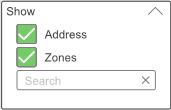
For more information, see Displaying and Searching for Loop Devices and Zones in a Graphic .
Status Menu
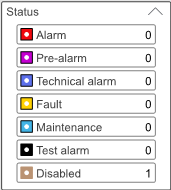
In WorkStation or WebStation, in a fire graphic, the Status menu displays the number of active alarms and alerts on loop devices and in zones. The category of alarms and alerts has a certain color, which is displayed on the loop devices and zones having alarms or alerts in that category.
Actions Menu
In WorkStation or WebStation, in a fire graphic, you use the Actions menu to disable and enable loop devices and zones in the graphic. On loop devices, you turn external output relays on and off. You also request address updates on loop devices. By executing system commands, you affect different categories of alarms and alerts in the entire fire detection system.

For more information, see Saving a Selection of Loop Devices In a Graphic .
For more information, see Deleting a Selection of Loop Devices in a Graphic .
For more information, see Turning External Output Relays On or Off from a Graphic .
For more information, see Disabling a Loop Device or a Zone from a Graphic .
For more information, see Enabling a Loop Device or a Zone from a Graphic .
For more information, see Requesting an Address Update on Loop Devices from a Graphic .
For more information, see Executing System Commands from a Fire Graphic .
How Graphics Work in Fire Operation